

Quick definition. Time boxing is the practice of assigning a fixed, pre-set block of time to a task and stopping — or deliberately deciding to continue — when that block ends, regardless of whether the task feels finished. The box is the constraint. What goes in it is up to you.
Most advice about managing time tells you what to do with a to-do list. Time boxing tells you what to do with the clock instead. You decide in advance how long something gets — twenty minutes for inbox triage, ninety minutes for the proposal, five minutes for a Slack reply — and when the timer runs out, the task's claim on your attention runs out with it. The task might not be done. That is allowed. What is not allowed is the box quietly becoming three boxes because nobody called time.
It sounds like a small trick. It changes two things that most productivity advice never touches: how long something is allowed to take, and when you are required to decide it is over.
Time boxing vs. time blocking: the difference that matters
The two terms get used interchangeably, and the mix-up hides the one thing that actually matters. Time blocking is scheduling — you reserve 9:00–10:30 for "Q4 roadmap" the same way you would reserve it for a meeting, so the work has a place to happen instead of competing for whatever is left of the day. Time boxing adds a rule on top of the schedule: when 10:30 arrives, you stop. Ship it, hand it off, or carry the rest forward deliberately — but the box closes on time, not when the task feels finished.
Every time box is a time block. Not every time block is a time box — most calendars are full of blocks nobody intends to actually stop at. That distinction is where most of the method's value lives, and it is also where most people quietly stop doing it: respecting a deadline you set for yourself, with nobody else watching, is a different skill than respecting one someone else set for you.
Why a deadline you invented yourself still works
The mechanism behind time boxing has a name: Parkinson's Law — work expands to fill the time available for its completion. Give a report a week and it takes a week. Give the same report ninety minutes and, more often than people expect, it gets written in ninety minutes. The box does not make you faster at the task. It removes the slack the task would otherwise have absorbed.
It also answers a question your brain asks constantly and rarely gets a real answer to: when am I allowed to stop this and do something else? Without a box, that question gets answered by guilt, by the next interruption, or by exhaustion. With a box, it is answered in advance, which is a big part of why time-boxed work tends to feel less effortful even when the same amount gets done.
When time boxing genuinely helps
Deep work that would otherwise sprawl
Writing, design, strategy, code review — anything where "good enough to ship" and "could keep polishing forever" are both true at the same time. A box forces the second decision before the first one gets made by accident at 9pm.
Reducing decision fatigue
Deciding what to do next is a cost, paid every single time you finish something without a plan for what comes after. A boxed day decides that cost away in one sitting, each morning, instead of fifteen times throughout the day.
Protecting focus from your own calendar
An empty calendar slot looks free to everyone, including meeting organizers. A box with a name on it — "Deep work · Q4 roadmap doc" rather than nothing — reads as occupied, which is most of the reason boxed calendars get fewer meetings dropped into the middle of them.
Shallow work that has no natural edges
Email, Slack, admin, approvals — tasks with no built-in stopping point will take exactly as long as you let them. A fifteen-minute box is often the only thing standing between "check email" and "lose the morning to email."
Meetings and workshops
This is the one version of time boxing nobody has to be convinced of: Scrum formally time-boxes sprints, stand-ups, and retrospectives for exactly this reason — a fixed ceiling is what keeps a quick status round from becoming an hour-long discussion.
What time boxing is not for. It is not a cure for having too much to do — it only decides the order and the ceiling. If your week genuinely does not fit in your week, boxing it more tightly will not fix that; it will just make the overflow visible sooner, which is useful, but it is a different problem with a different solution.
Who actually does this, and how
Elon Musk is the most-cited extreme case. Since a 2017 interview, and in profiles since, Musk has described scheduling his day in roughly five-minute increments across Tesla, SpaceX and his other companies — treating every slot, down to a five-minute stretch, as a box with a defined purpose. It is an unusually rigid version of the method, built for someone coordinating several companies in parallel, and it is a useful data point about the ceiling of how far time boxing can be pushed — not a template most people should copy wholesale. Nobody needs five-minute boxes to get the benefit; most people get it from boxes an order of magnitude longer.
Cal Newport, the computer scientist and author of Deep Work, is the person most responsible for bringing time boxing into mainstream productivity writing. His version — he calls it time block planning — is to box the entire working day in advance, including the shallow work, so that unplanned time never silently becomes the default. It is deliberately less extreme than Musk's version and built to be sustainable over years, not news cycles. His method is also the one Calendrite's own planning tools are modelled on, which is the direct reason this article exists.
Scrum teams time-box at the project level rather than the personal one: a sprint is, by definition in the Scrum Guide, a time-boxed iteration with a fixed length agreed in advance. The box is not a productivity trick there — it is the mechanism that makes a sprint a sprint instead of an open-ended to-do list with a deadline attached whenever someone feels like calling it.
And the idea predates software by roughly two centuries: Benjamin Franklin's well-known daily schedule, published after his death, assigned a fixed question and a fixed hour to each part of the day — "What good shall I do this day?" at 5am, work blocks through the afternoon, an evening review. It is not time boxing in the modern software sense, since nothing forced him to stop on time, but it is the same underlying bet: a day with pre-assigned shape beats a day that gets shaped by whatever shows up.
Try the version Calendrite builds for you every morning. Three priorities, whatever is loose in your head, and the day boxed before it fills itself — free, no card required.
Start free →When time boxing backfires
The method has real failure modes, and pretending it does not is how people end up blaming themselves for a tool problem.
Early-stage, open-ended thinking
Research, exploration, and the kind of thinking that needs to wander before it finds anything worth keeping does not respond well to a buzzer. Cutting off a good idea mid-thought because the box ended is a real cost, not a discipline win. Box the exploration session itself if you need structure — "ninety minutes to read and think" — but do not box the idea.
Highly reactive roles
Frontline support, on-call engineering, triage-heavy work — anywhere the job is responding to what shows up, not working through a plan. A calendar full of boxes gets destroyed by the first ticket, and a destroyed schedule that gets rebuilt five times a day produces more stress than the unstructured version it replaced.
Estimates that are reliably wrong
If every box you set runs over by the same margin, the problem usually is not willpower — it is the estimate. Boxing a task you consistently misjudge just manufactures a fresh reason to feel behind, on schedule, every day. Widen the box or fix the estimate before blaming the method.
Rigidity that outlaws interruption
A day boxed so tightly that a five-minute question from a colleague wrecks the whole afternoon is not disciplined, it is brittle. The people who sustain this longest build in airlock time — short, unassigned buffers between boxes — specifically so a normal interruption does not cascade through the rest of the day.
How to actually do it, in five steps
- Pick three things that matter, before anything else gets on the calendar. Not ten. Three is few enough that you will actually protect them when the day gets noisy.
- Get everything else out of your head first. A list you trust is what lets you stop re-deciding priorities all day — write down the loose stuff once, then ignore it until you box it or discard it.
- Match the box to the work. 50–90 minutes for deep work that needs a runway, 25–50 for a focused single task, 15–30 for shallow work and admin. A box that is too short for the task just gets ignored; one that is too long defeats the point.
- Name the box what it is. "Deep work · Q4 roadmap" on the calendar reads as occupied. A blank slot reads as available — to you and to everyone who can see it.
- Leave airlocks. A short buffer between boxes absorbs the interruption that would otherwise knock over everything scheduled after it.
How Calendrite's Time Box works
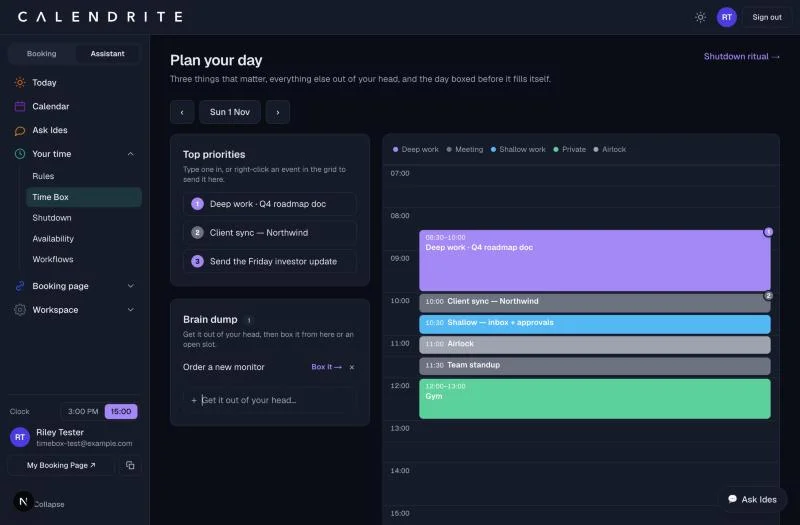
We built Time Box as the morning counterpart to a different ritual, Shutdown, which closes the day out. Time Box opens it. The screenshot above is the real thing, not a mockup — here is what each part does:
- Top priorities. Three slots, no more. Type one in by hand, or right-click any event already on your calendar and send it straight into the list — the slot picks up the event's own color, so the three things that matter most are visible at a glance, not buried in a list.
- Brain dump. Get the loose stuff out of your head in one place. Each item can be boxed onto the calendar with one click, or dismissed once it turns out not to matter.
- The day, boxed half an hour at a time. Every connected calendar — Google, Microsoft, or a published feed — feeds into one grid, color-coded by what kind of time it is: deep work, meetings, shallow work, private time, and airlock buffers. An open slot takes one click to become a box: Deep work, Meeting, Shallow or Airlock, or a custom title for anything else.
- Priorities and boxes stay linked. Promote a calendar event to a priority and it is retagged in that category immediately, so the box on the grid and the badge in the priority list always agree — no separate system to keep in sync by hand.
It runs on the same method Cal Newport describes: a weekly deep-work budget, airlocks around focused time, meeting load kept visible rather than invisible, and a shutdown ritual that closes the loop at the other end of the day. The part we think matters most is that every rule has a switch — Time Box proposes a shape for the day; it never locks you into one.
See your own day boxed like this, in under five minutes. Connect a calendar, set three priorities, and Ides boxes the rest with you.
Start free →The short answer
Time boxing works when a task's real enemy is open-endedness — deep work that would sprawl forever, shallow work with no natural edge, a meeting that would otherwise run long. It works badly when the job is to respond to what shows up, when the thinking needs room to wander before it finds anything, or when your estimates are wrong often enough that the box becomes a source of stress rather than structure. Most people land somewhere between Cal Newport's every-minute-planned day and no plan at all — and the right amount of boxing is usually less than you think, applied to fewer things than you think, with real buffers between them.
Box your day before it fills itself
Three priorities, whatever is loose in your head, and the day laid out half an hour at a time — free, no card required.
Start free with CalendriteFAQ: time boxing
What is time boxing in simple terms?
Time boxing is giving a task a fixed amount of time on your calendar and stopping when that time is up, whether the task is finished or not. It turns open-ended work into a container with a start and an end, so the clock — not your mood or how deep the task turns out to be — decides when you move on.
What is the difference between time boxing and time blocking?
Time blocking means putting a task on your calendar at a set time. Time boxing adds a rule on top of that: when the box ends, you stop, hand it off, or ship what you have, rather than running over. Every time box is a time block; not every time block is a time box.
Does Elon Musk really schedule his day in 5-minute blocks?
Musk has described planning his day in roughly 5-minute increments, a habit widely reported since a 2017 interview and repeated in later profiles. It is an extreme, high-discipline version of time boxing rather than the version most people should start with — most people get the benefit from boxes of 25 to 90 minutes.
When should you not use time boxing?
Skip it for early-stage, open-ended thinking where a forced stop cuts off a good idea mid-thought; for highly reactive roles such as frontline support or on-call work where the next interruption is unplanned by definition; and for any task where your time estimates are so unreliable that boxing just produces a steady feed of guilt instead of structure.
How long should a time box be?
Match the box to the kind of work: 25 to 50 minutes for focused individual tasks, 50 to 90 minutes for deep work that needs a runway to get into flow, and 15 to 30 minutes for admin, email or other shallow work. Meetings should be boxed to the shortest length the agenda actually needs, not the default the calendar app suggests.